



Note: The conditions for correct connection of data carriers are given in appendix 3.
To view image files, click the "Photos" button (figure 2), after which a menu appears with a list of image files that are on the selected media.
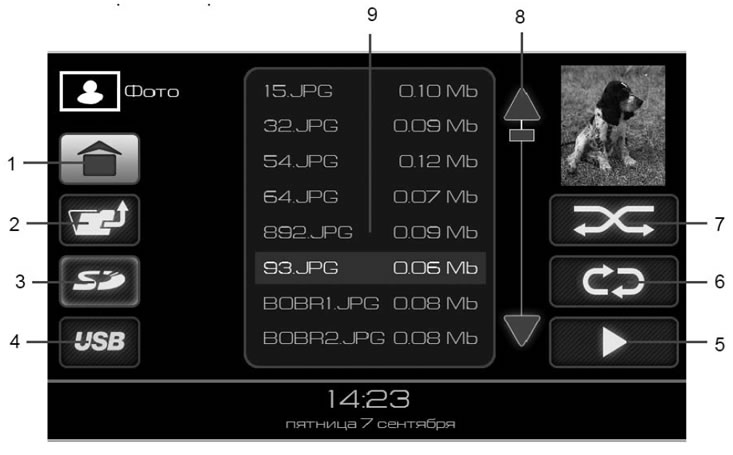
Figure 8. The "Photos" mode window
- 1 - button to go to the main window;
- 2 - button to move from a folder one level up;
- 3 - SD memory card selection button as a source;
- 4 - button to select USB flash drive as a source;
- 5 - play button;
- 6 - button to turn on the repeat playback mode;
- 7 - button to turn on random playback mode;
- 8 - buttons for scrolling the file list;
- 9 - list of files.
Selecting image files
The radio receiver supports playback of image files of the following formats:.JPEG,.JPG,.JPE,.BMP, GIF,.PNG.
The table shows the approximate loading time for a jpeg file:
| Jpeg file size | Opening time (seconds) |
| 800x1397 px, 1 MB | ~1 sec |
| 1024x1789 px, 2 MB | ~3 sec |
| 1200x2096 px, 2.5 MB | ~4 sec |
| 1978x3456 px, 7 MB | ~9 sec |
It takes quite a long time to open files larger than 7MB and viewing them on the device is not recommended.
The recommended file size is no more than 1 MB with a resolution of no more than 800x1397 px, since the opening time of such a file is about one second, which corresponds to the minimum time for viewing an image in slide show mode.
Files and folders available for viewing are displayed in the list (9) (figure 8).
To display a list of files inside a folder, click on the image of the O folder in the list (9) in Figure 8. To exit the folder, click button 2 (figure 8).
Click on the file image in the list and press button 5 (figure 8), or double-click on the selected file to start browsing files, starting with the file highlighted in the list with the cursor. To organize a slide show, repeat playback mode must be enabled. The radio receiver will switch to the image file playback window.
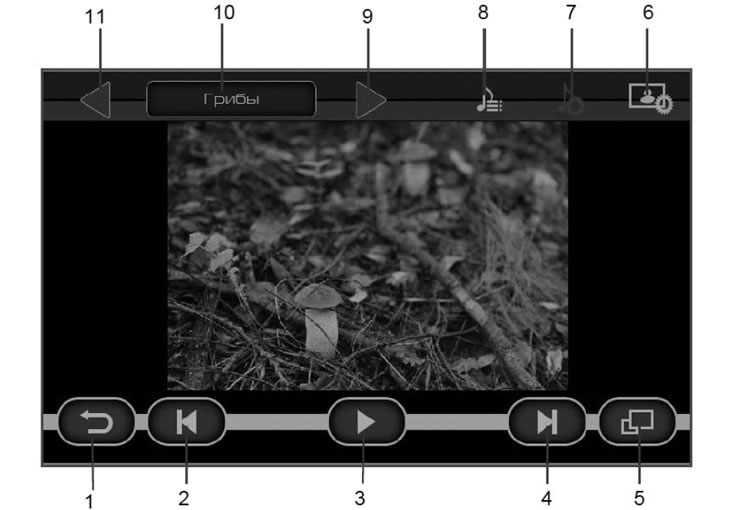
Figure 9. Image file playback window
- 1 - return button to file selection menu;
- 2 - | ◀ button to turn on display of the previous file;
- 3 - ||/▶ Stop the display (pause) button. When the button is clicked, the playback position is stored. And when you return to this page, playback continues from the remembered position;
- 4 - ▶ | button to turn on display of the next file;
- 5 - button to enable full screen playback mode;
- 6 - button to go to the photo settings window;
- 7 - button to go to the sound settings window;
- 8 - button for selecting an audio file to play when viewing photos;
- 9 - go to the next folder to play files;
- 10 - name of the current folder;
- 11 - go to the previous folder to play files.
If you press the II button (3) while viewing photos (figure 9), and then press the back button (button 1, figure 9), then you go to the main menu, and on the "Photos" button (figure 2) the pause indicator appears. This mode allows you to return to viewing photos from the point where you paused.