



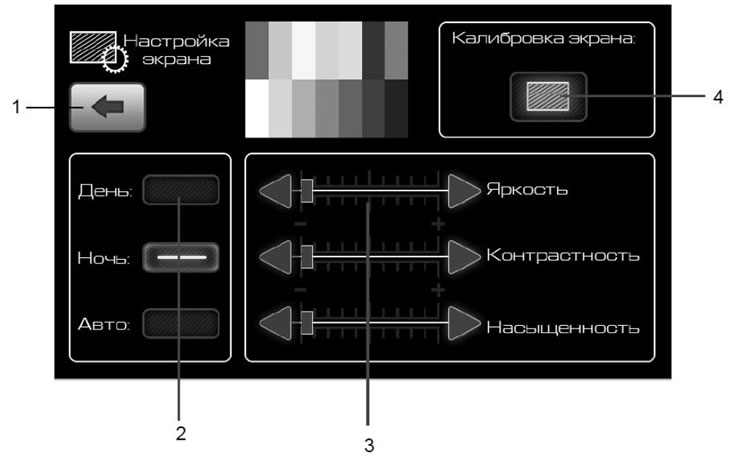
Figure 17. Screen settings window
- 1 - button to return to the previous menu;
- 2 - buttons for switching the display backlight mode;
- 3 - buttons for adjusting image parameters on the display;
- 4 - button for switching to the touch panel (screen) calibration mode.
For better perception of information from the screen, depending on the time of day, it is possible to set the display operating modes:
- Day - comfortable display glow in bright light;
- Night - comfortable display glow in the dark.
For each display mode, Day or Night, you can set your own display image parameters: Brightness, Contrast and Saturation.
(Main material on the website: «www.Ladaman.ru»)
In the future, call up the settings you have made with one click on the Day or Night button.
Pressing the Auto button resets the Brightness, Contrast and Saturation settings to the middle position.
To set the desired image parameters, use buttons 3 (figure 17).