



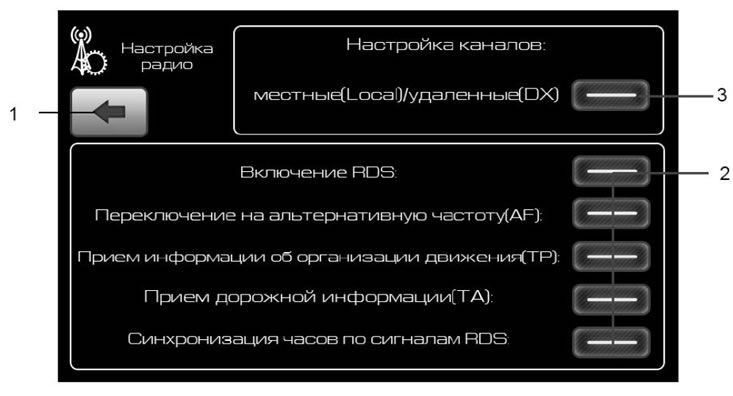
Figure 19. "Radio" settings window
- 1 - button to return to the previous menu;
- 2 - RDS settings buttons;
- 3 - button to enable reception of signals from remote radio stations. Reduce receiver sensitivity to select radio stations with a strong signal.
Selecting modes when receiving RDS stations
RDS (radio data transmission system) allows for the simultaneous transmission of additional information signals in digital form along with the broadcast signal: station identification code (PI, Programe Indentification), radio text, time signals, traffic information, etc. Reception of RDS signals allows you to expand the service capabilities of the receiver.
RDS stations can be received in the VHF2 (87-108) MHz range. Availability of RDS functions depends on the specific radio station.
Enabling alternative frequency reception mode
If the signal level of the received radio station becomes weak (for example, when moving from one area to another), the RDS system allows automatic tuning to other RDS stations with a higher signal level, transmitting the same program of the same radio station, but on a different broadcast frequency (alternative frequencies). If there is no radio station with this program on alternative frequencies, the radio receiver remains tuned to the current radio station. Press the AF button* (figure 19) in the receiver settings window to enable the alternative frequency reception mode. As the signal level of the received radio station weakens, the receiver will automatically switch to the search mode for the received radio station on an alternative broadcast frequency. To turn off the alternative frequency reception mode, press the AF button again.
The text of the article was taken from the website: www.LadaMan.ru
#img2#
Enabling the mode of receiving information about the traffic organization procedure
Press the TP* button to turn on the traffic management message reception indication mode. The TP symbol (figure 3). When receiving a message about the traffic organization procedure on the highway, it will be repainted in a lighter color.
Enabling the mode of receiving urgent information about changes in the traffic situation
Press the TA* button to activate the mode for indicating the reception of urgent messages about changes in the traffic situation. The TA symbol will appear in the Radio window (figure 3). When an urgent traffic message is received, it will change to a lighter color.
Enabling clock synchronization mode using RDS signals
Click the "Sync Clock via RDS" button to enable time and date synchronization using RDS signals. The "Radio" window will display the CT symbol (figure 3). When receiving information about the current time, the current time and date will be adjusted.