



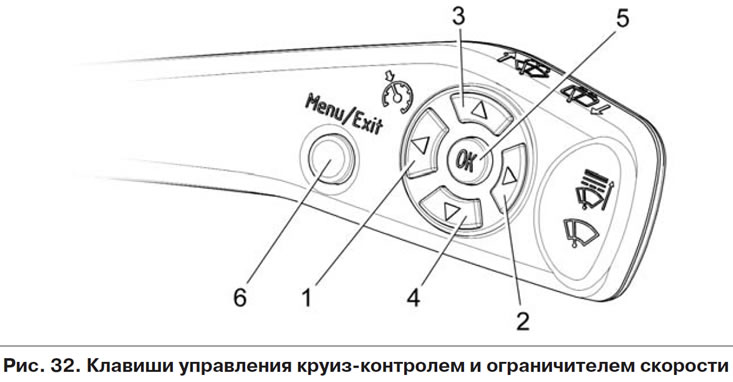
- key 1, "CC" - turning on the "Cruise control" function (press again - turn off);
- key 2, "SL" - enabling the "Speed Limiter" function (press again - turn off);
- key 3, "Set+" - activation of the enabled function with speed setting (subsequent pressing - increase of the set speed of the vehicle);
- key 4, "Set-" - activation of the enabled function with speed setting (subsequent pressing - decreases the set speed of the vehicle);
- key 5, "OK" - resume or deactivate the enabled function;
- key 6, "Menu" - enter the control mode of the "CC and OS" functions (press again - exit from the control mode of the functions of the CC and OS).
With the ignition switch on, press and hold (more than 1 second) keys 6 on the steering column switch (hereinafter SS) (figure 32) should result in the "PP" keys being switched to the "CC and OS" functions control mode. The indicator on the additional LCD of the instrument cluster (hereinafter referred to as the CC) should turn on
 (mode for selecting the "CC and OS" function), indicating that the "PP" keys have been switched to the "CC and OS" function control mode.
Repeated long press (more than 1 second) keys 6 on the PP should lead to an exit from the control mode of the "PP" keys for the "CC and OS" functions, while if it was selected (enabled), activated (or deactivated but not turned off) one of the functions, then it should be turned off.