



Locking the doors and turning on the security mode using the remote control
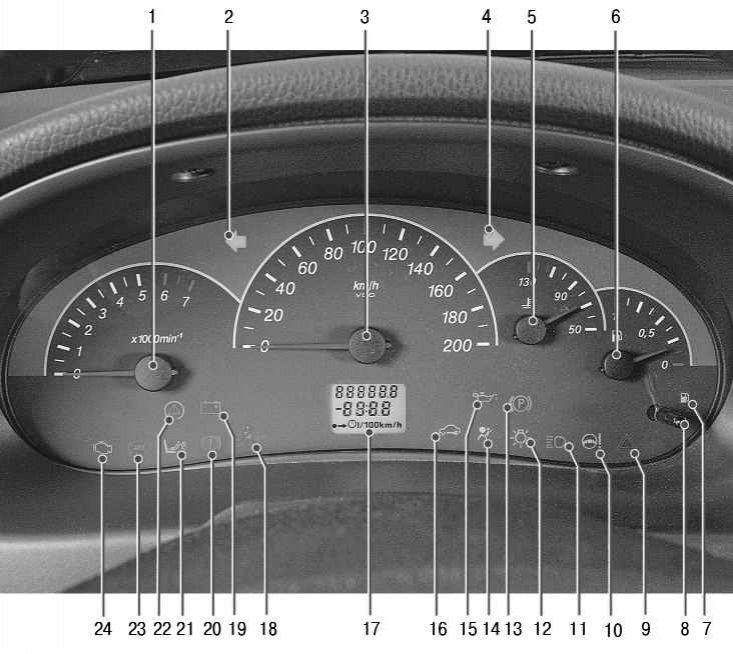
Figure 1.7. Instrument cluster
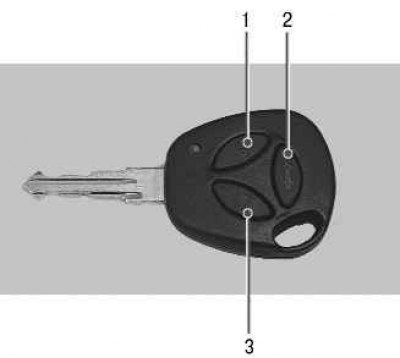
Figure 10.12. Remote control: 1 – unlock button; 2 – trunk lid release button; 3 – lock button
To lock all vehicle doors, press button 3 (figure 10.12) on the control panel. The door locks will be locked, the security mode will be activated, the direction indicators will flash once, and the immobilizer indicator lamp 16 (see figure 1.7) will switch to slow blinking mode.
Note: If any of the security zones are open when the vehicle is armed (hood, trunk or doors), then the direction indicators will flash three times and the system will sound one beep. To arm open zones, close them.
Note: The system will also respond to the activation of the door lock overheating protection when the door locks are locked or unlocked multiple times within a short period of time. In this case, the system's functionality will soon be fully restored.
Locking the locks with a remote control without turning on the security mode
To lock the car doors using the remote control without turning on the security mode, press the lock button 3 twice or hold it down for a while (see figure 10.12). The car doors will lock without activating the security mode, and the direction indicators will flash three times.
Note: If you press button 3 twice or hold it down while the security mode is previously enabled, the security mode will be disabled, the direction indicators will flash twice, and the car doors will remain locked.
Unlocking door locks and disabling security mode using the remote control
To unlock the driver's door and disarm the system using the remote control, press button 1 (see figure 10.12) unlock on the remote control. The direction indicators will flash twice, the security mode will be turned off, and only the driver's door will be unlocked.
To unlock the passenger doors, press the unlock button on the remote control again.
Note: If after disabling the security mode none of the doors or the trunk lid is opened, the immobilizer indicator lamp 16 (see figure 1.7) will switch to a rapid flashing mode, after 25 seconds the doors will be locked again and the system will switch to security mode.
Unlocking the trunk lid with the remote control
To unlock the trunk lid, press or hold button 2 twice (see figure 10.12) remote control.
Note: The trunk lid release function using the remote control is only available on vehicles equipped with an electric trunk lid lock.
When the security mode is on, unlocking occurs with simultaneous disabling of this security zone for 25 sec. If the trunk lid is not opened during this period, it is automatically locked again, and if the trunk lid was opened, this security zone is automatically disabled until it is closed.
To lock the trunk lid after closing, press button 2 on the remote control.
Central control of door locks from the passenger compartment
To lock or unlock all vehicle doors, press the lock button located on the driver's door armrest. You can also lock the doors by pressing the lock button in the driver's door.
Central control of door locks from outside the car
To lock all vehicle doors from the outside, turn the key clockwise in the driver's door lock. To unlock the front doors from the outside, turn the key in the lock counterclockwise, then only the door that you are opening at that moment will be unlocked.