



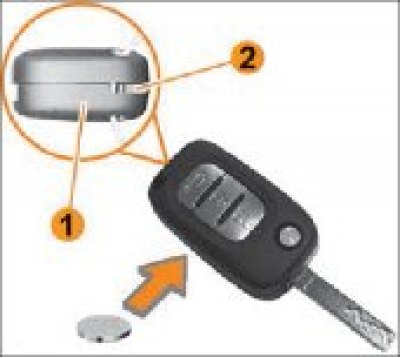
Figure 8.10. Replacing the remote control battery: 1 – Remote control. 2 – Hole in the connector of the housing and cover of the remote control.
In the remote control (Figure 8.10) a CR2032 type power supply is used.
To replace it, follow these steps:
- insert a screwdriver into hole 2 on the side of the remote control and turn it to start opening the top cover;
- when replacing, be careful not to touch the contact surface of the battery and the surface of the electronic circuit;
- insert a new battery using a soft cloth, without touching its contact surface, observing the connection polarity indicated on the cover of the remote control;
- assemble the top and bottom halves of the remote by inserting one part into the other and pressing until it clicks into place, making sure the cover is securely latched.
Attention!
- Wrap the screwdriver blade in a soft cloth to avoid damaging the viewing surface of the remote control.
- Use only CR2032 battery.
Warning!
- It is prohibited to dispose of used batteries together with ordinary household waste. When disposing of used batteries, please remember to protect the environment.
- Hand them over to organizations responsible for their collection and recycling.