



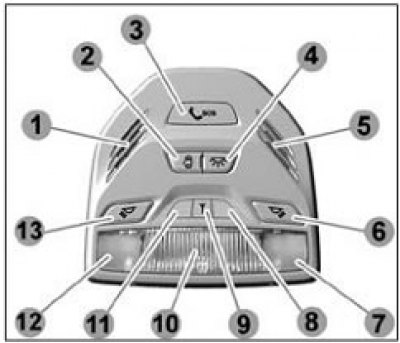
1 - Location of the microphone for the emergency services call system. 2 - Key for switching on the general interior lighting section in the "On with door open" mode. 3 - Key for calling emergency services. 4 - Key for switching the general interior lighting section to the "On" mode. 5 - Location of the loudspeaker for the emergency services call system. 6 - Key for switching on individual lighting of the front passenger seat. 7 - Individual lighting section for the front passenger seat. 8, 11— Reserve. 9 - Emergency services call system status indicator. 10 - General lighting section. 12 - Individual driver's seat lighting section. 13 - Key for switching on individual driver's seat lighting.
General description
The interior lighting unit performs the functions of general interior lighting, driver's seat and front passenger seat lighting, as well as communication functions with the ERA-GLONASS system operator.
When you press the 4 key with the icon
 the general lighting mode is switched on. Pressing key 2 switches on the "on when door is open" mode. If both keys are pressed, the key with the icon has priority .
Pressing buttons 6 and 13 turns on the individual lighting mode for the front passenger and driver, respectively.
Switches for general and individual lighting modes are push-button type with a fixed "On" position.
 - indicator 9 of the emergency services call system status, red. Lights up for 5 seconds each time the ignition is turned on, then goes out. The indicator also lights up if there is a malfunction in the emergency services call system.
Emergency call system
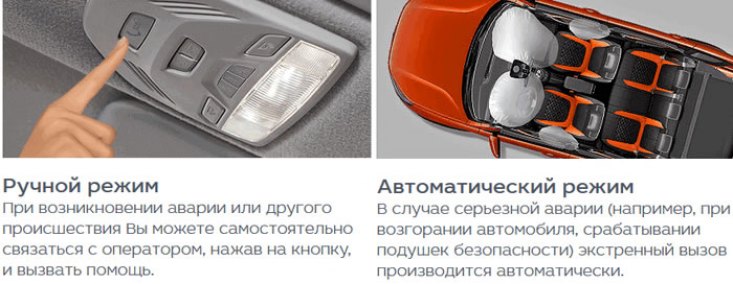
Your vehicle is equipped with an emergency call system (further SVEOS), designed for automatic (in case of an accident) and manual call of the ERA-GLONASS system operator. The microphone and loudspeaker are used to communicate with the ERA-GLONASS system operator.
 - key 3 for calling the ERA-GLONASS system operator is located in the interior lighting unit. Push-button switch with non-fixed "On" position. The key press time for initiating an emergency call is 2 seconds.
In standby mode (with ignition on) SVEOS performs self-diagnostics, receives signals from GLONASS and GPS navigation satellite systems, and continuously calculates time, speed, direction of movement, and coordinates of the vehicle's location.
Automatic emergency call
In the event of a road traffic accident (RTA), if the airbags have deployed or the vehicle has overturned, the SVEOS generates a minimum data set containing information on the coordinates and parameters of the vehicle's movement at the time of the RTA, the time of the RTA, the VIN code of the vehicle and other information necessary for emergency response, and transmits it to the operator of the ERA-GLONASS system. After transmitting the minimum data set, the operator is called to establish voice communication. When calling the operator, the backlight of key 3
flashes red. When transmitting a minimum set of data and during voice communication with the operator, the backlight of key 3 continuously lights up red. When making voice communication, SVEOS disables the sound reproduction of the standard (or additionally installed) radio receiver (multimedia system, radio), if sound was being played before the emergency call was made.
SVEOS makes an automatic emergency call only when the ignition is on.
Manual emergency call key 3
Manual call can only be made when the ignition is on. To make an emergency call manually, press key 3
on the interior lighting unit and hold it down for at least 2 seconds. The SVEOS operation algorithm for a manual emergency call is similar to the algorithm described above for an automatic emergency call.
If during the dialing process (while the backlight is on
flashing red), initiated by pressing key 3 , press the key again and hold for at least 2 seconds, the emergency call will be cancelled (the red key backlight will be turned off).
"Off" mode
The SVEOS is in this mode if no emergency call is made and if the ignition is off.
In "Off" mode, there is no backlight on key 3
and also the system status indicator 9 does not light up . In the "Off" mode, the SVZOS does not respond to pressing the 3 key . The SVEOS exits the "Off" mode when the ignition is turned on.
Test mode
The test mode is designed to check the operability of the SVEOS components. In the test mode, the operability of the SVEOS status indicator, microphone and loudspeaker in the interior lighting unit, backup battery and other internal SVEOS components is checked.
If you wish, you can independently check the functionality of the SVEOS by running the test mode. To start the testing mode you need to:
- make sure the engine is off;
- turn the key in the ignition switch (33) to the "Ignition on" position and wait 1 minute;
- from the "Ignition on" position, switch 33 6 times between the "Ignition on" and "Ignition off" positions according to the algorithm described below within no more than 5 seconds.
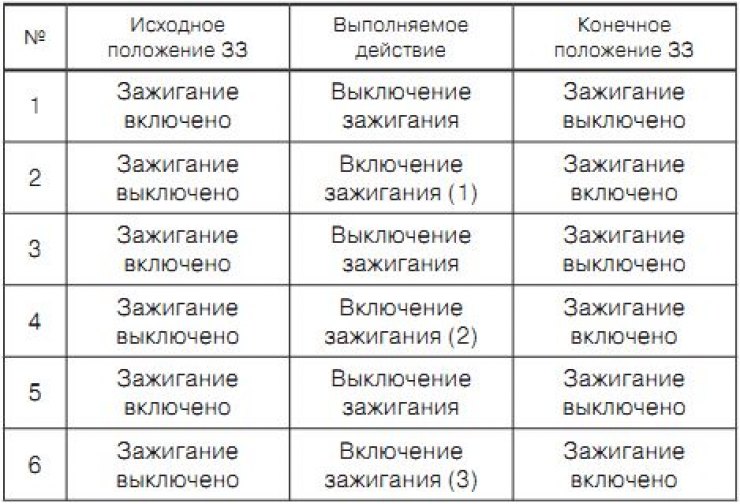
After the 3rd ignition switch-on (switch 33 No. 6), the ESC goes into test mode if the engine was not started during the entry procedure.
The sound prompt "Test procedure started" will be played.
During the testing, the functionality of the microphone and speaker will be checked. After the audio prompt "Say the test phrase" is played, you will need to say any phrase no longer than 5 seconds. Immediately after this, the audio prompt "Play the test phrase" will be played, and then the phrase you said will be played. Then the audio prompt "Enter the test result" will be played. If the microphone and speaker testing is successful, then you need to switch 33 twice according to the algorithm described below within no more than 3 seconds:
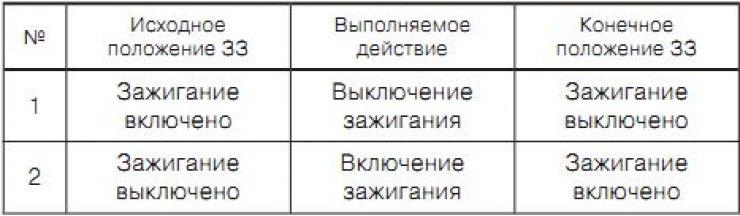
If any errors occur during testing of the microphone and speaker (the spoken phrase was not reproduced, was reproduced too quietly or with distortion, etc.), then after the sound prompt "Enter the test result" is played, no switching 33 needs to be done for 7 seconds.
If any errors are detected at the end of the testing procedure, you should contact your LADA dealer to fix the problem.
If you detect a malfunction in the operation of the SVEOS, we strongly recommend that you immediately contact your LADA dealer to identify and fix the malfunction!
When operating a vehicle with a fault in the SVEOS, its operation in the event of an accident is not guaranteed!
Backup battery
The SVEOS control unit contains a backup battery, which is necessary to ensure the operability of the SVEOS in the event of damage to the vehicle's battery during an accident.
When the ignition is on, the charge level of the backup battery is monitored and recharged if necessary.
The backup battery life is 3 years.
Replacement of the backup battery is carried out only by a LADA dealer.
If any malfunctions of the SVZOS are detected, you should contact your LADA dealer to have the malfunction eliminated.
System status indicator 9
When the ignition is turned on, the system status indicator 9
lights up red for 5 seconds, then goes out. The indicator also lights up red when any errors in the operation of the SVEOS are detected.
After the ignition is turned on, the internal modules of the SVEOS are initialized and their self-diagnostics are performed. This process takes no more than 1 minute. While initialization and self-diagnosis are in progress, the system status indicator 9
does not light up, even if errors were previously detected. Therefore, to determine the presence of errors after turning on the ignition, you must wait 1 minute.
The table below describes the operating modes of the alarm:
| Nature of the malfunction | Operating mode of SVEOS | Key 3 backlight color (orange/red) | State 9 |
| Everything is fine | Initialization (when the ignition is turned on) | Doesn't glow or is orange(with the parking lights on) | Burns for 5 seconds |
| Standby mode | Doesn't glow or is orange(with the parking lights on) | It doesn't burn | |
| Dial-up | Red light flashes | ||
| Voice communication | Red light is constantly on | ||
| Malfunction of SVEOS components | Standby mode | Doesn't glow or is orange(with the parking lights on) | It's on fire |
| Dial-up | Red light flashes | ||
| Voice communication | Red light is constantly on |