
Car repair AvtoVAZ Car repair Renault Car repair Hyundai Car repair Ford Car repair Volkswagen Car repair Audi Car repair Chevrolet
English Русский
Български
Беларускі
Український
Српски
Hrvatski
Română
Polski
Slovenský
Magyar
articles sitemap contacts bookmark
LadaMan.ru


Kalina Granta Priora Vesta Largus XRAY
X-Ray 1 (2015-2022)

Adjusting the volume of audio devices (XRAY 1)

  • Main
  • XRAY
  • X-Ray 1
  • General information
  • User manual
  • Adjusting the volume of audio devices
0
Contents: "Volume" ⇣ Low, mid, high frequencies ⇣ Sound settings ⇣
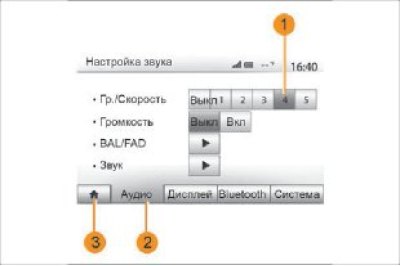
Figure 22. Sound adjustment

Figure 22. Sound adjustment


Enter the settings menu by pressing "Main Menu" → "Settings". Press 2 to access the sound settings.

You can exit the settings menu and return to the main menu page by pressing 3.

Changing the sound level depending on the speed ("Gr./Speed").

When the vehicle speed exceeds 40 km/h, the volume level increases relative to its initial level.

Change the volume/speed ratio by pressing one of the buttons in zone 1.

You can disable this feature by clicking "Off".

"Volume"


Press "On" or "Off" to turn on or off the volume feature, which allows you to enhance the bass and treble sounds.

Distribution of sound between left/right and front/rear speakers in the passenger compartment.
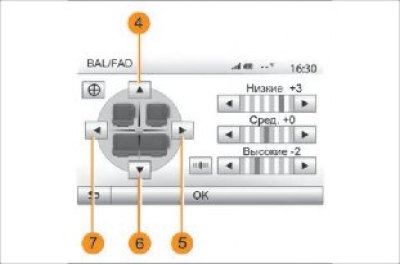
Figure 23. Sound distribution

Figure 23. Sound distribution


Press buttons 5 or 7 to adjust the sound balance between the left and right speakers.

Press buttons 4 or 6 to adjust the sound balance between the front and rear speakers.

After adjusting the balance, press "OK" to confirm.

Low, mid, high frequencies


Press the left or right arrow button to adjust the bass, mid, and treble.

Once you have finished setting up, click "OK" to confirm.

Sound settings
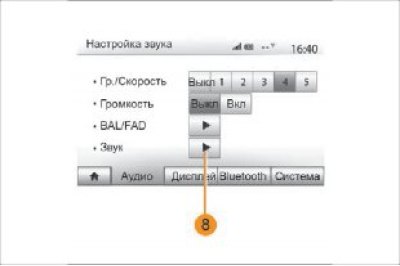


Figure 24. Entering «Sound Settings»

Figure 24. Entering "Sound Settings"


Enter the Sound Settings menu by pressing button 8.
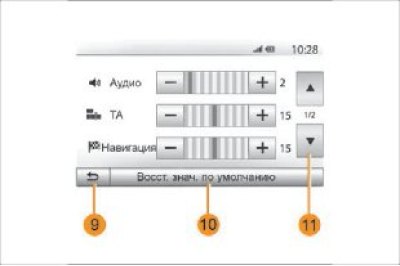
Figure 25. «Sound settings» menu

Figure 25. "Sound settings" menu


You can adjust the volume of each sound separately:
  • "Audio";
  • – "TA";
  • "Navigation";
  • "Telephone device";
  • "The Ring" (on the phone)

To do this, press "+" or "–".

Press button 10 to reset all sound settings. Press button 11 to go to the second page. Press button 9 to return to the previous screen.

For more details, see the page (www.Ladaman.ru)


This article is available at russian, bulgarian, belarusian, ukrainian, serbian, croatian, romanian, polish, slovak, hungarian
This article has been reviewed: Daniil Markelov
Share with friends:
◀ Previous
Lada X-Ray 1: User manual
Next ▶

Additional audio devices
Operation and use of the multimedia system
Multimedia system
Oils, candles and lamps
Technical characteristics of the car
Navigation system
Entering a destination (navigation)
Navigation route guidance
Navigation map settings
Navigation system settings
More articles with information from manuals for Lada:

• Special tools and devices Lada Kalina Hatchback (2004-2013, VAZ-1119)
• Adjusting the position of the steering wheel Lada Granta 1 (2011-2023, VAZ-2190)
• Adjusting the position of the front seats Lada Priora 1 (2007-2018, VAZ-2170)
• Adjusting the seat and steering wheel position Lada Vesta 1 (2015-2023, VAZ-2180)
• Liquids used (type, volume, brand) Lada Largus 1 (2012-2023)
Link to this article in various formats
Reviews and comments of visitors
No comments yet


Add up two numbers: 47 + 22


X-Ray 1 (2015-2022) 
  • General information
  • User manual
  • Maintenance
  • Daily care
  • Troubleshooting
  • Power unit
  • Engine repair
  • Fuel system
  • Cooling system
  • Repair H4M engine
  • Transmission
  • Clutch and drive shafts
  • Transmission
  • Chassis (running gear)
  • Front suspension
  • Rear suspension
  • Brake system
  • Steering
  • Body and interior
  • Exterior (external elements)
  • Interior (internal elements)
  • Electrical equipment
  • Equipment and devices
  • Lighting and signaling
LadaMan.ru © 2018–2026 | Mobile version | About Lada | Sitemap: EN BG BY UA RS HR RO PL SK HU | Contacts with admin | | Add to bookmarks
Kalina Hatchback (2004-2013) | Kalina Sedan (2004-2013) | Granta 1 (2011-2023) | Priora 1 (2007-2018) | Vesta 1 (2015-2023) | Largus 1 (2012-2023) | X-Ray 1 (2015-2022) |
This site uses cookies to ensure everything runs smoothly.