



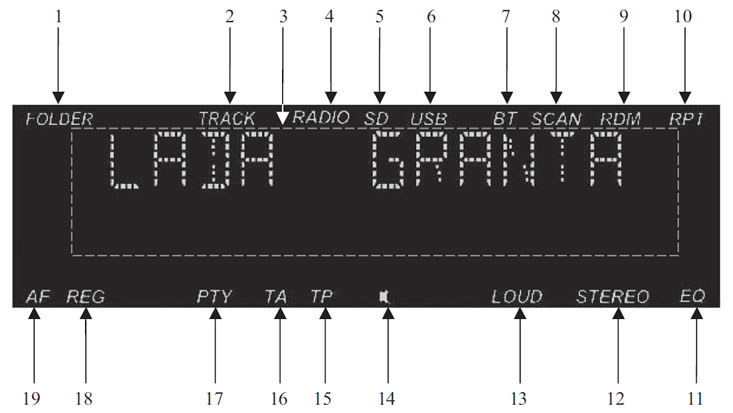
Figure 3. Radio receiver display
Figure 3 shows the appearance of the display:
- 1 - folder number indicator;
- 2 - indicator of the number of the track being played;
- 3 - playback window;
- 4 - "Radio" mode indicator;
- 5 - SD card playback mode indicator;
- 6 - USB flash drive playback mode indicator;
- 7 - indicator of connection to the radio receiver of the device via Bluetooth;
- 8 - radio station scanning mode indicator;
- 9 - indicator of random track playback mode;
- 10 - indicator of the repeat mode of the track being played;
- 11 - equalizer mode indicator;
- 12 - stereo mode indicator;
- 13 - loudness compensation mode operation indicator;
- 14 - Silent mode indicator;
- 15 - traffic information reception mode indicator;
- 16 - indicator of transmission of information about the general state of road traffic;
- 17 - indicator of the radio station search mode by the type of programs transmitted;
- 18 - indicator of the regional radio stations reception mode;
- 19 - indicator of the alternative frequency search mode.